Cyberhaven Platform Overview
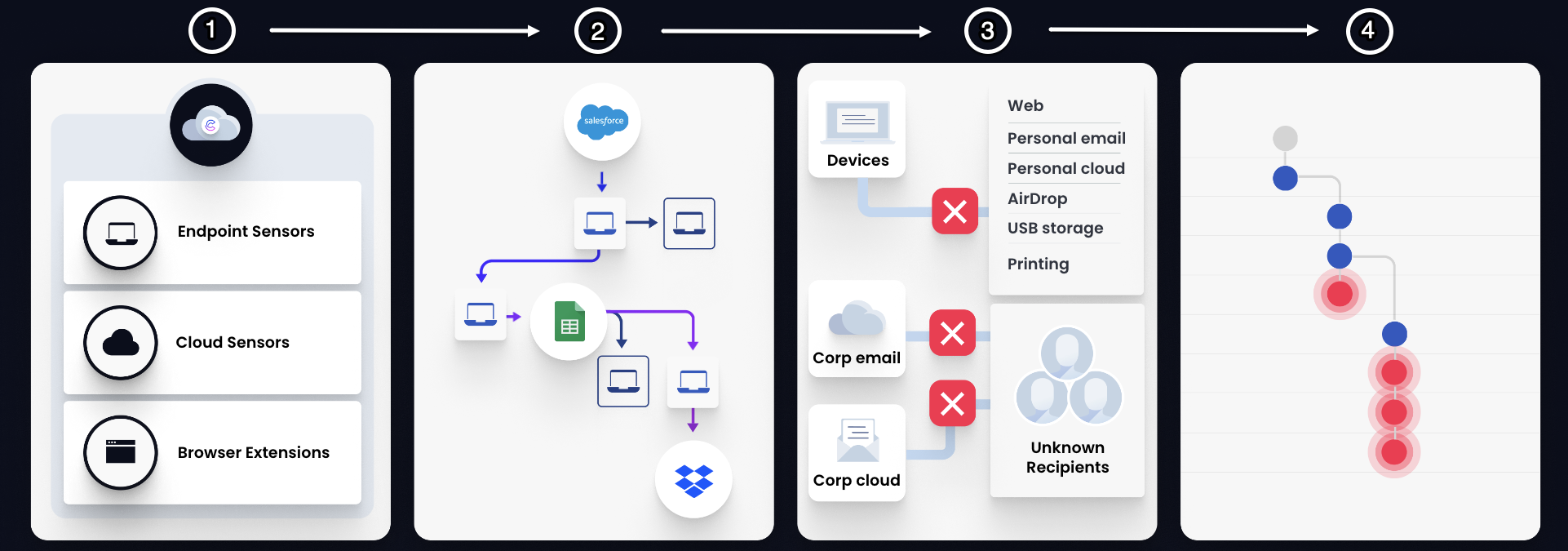
Cyberhaven is a data security platform that empowers organizations to safeguard their sensitive data from unauthorized access and data exfiltration. Using lightweight Endpoint Sensors, browser extensions, and cloud API connectors, Cyberhaven provides real-time, granular visibility into user interactions with your data, enabling you to promptly identify and mitigate potential risks.
Cyberhaven tracks the data lineage to give you a comprehensive understanding of how your data is being used across your network shares, SaaS applications, and endpoints. With Cyberhaven's extensive data classification capabilities, you can monitor and prevent user actions such as file access, modifications, transfers, and sharing, in real-time.
Additionally, our intuitive dashboards provide a user-friendly interface for viewing events and incidents and enabling you to analyze user behaviors effectively.
Data Detection and Response
Cyberhaven uses a comprehensive strategy to secure your data through Data Detection and Response (DDR). This approach involves,
- Collecting all events related to each data element, ensuring data classification and coverage.
- Tracing the origin and history of data to categorize and monitor it effectively.
- Enforcing your data security policies thoroughly.
- Enabling you to investigate user actions and prevent data exfiltration.
Data Classification
Cyberhaven employs a comprehensive approach to data classification, which is a critical component of our DDR strategy. By leveraging content-scanning capabilities, Cyberhaven effectively classifies data across all states.
Data in Motion: Cyberhaven monitors data movement between applications, cloud storage, or external devices, recording details such as source, destination, file path, and user information to ensure that data transfers comply with security policies. This includes tracking data copied or transferred from devices with the Cyberhaven sensor.
Data in Use: Cyberhaven provides visibility into how users interact with data on monitored machines, browsers, and SaaS environments, enabling you to prevent unauthorized access to sensitive data.
Data at Rest: Cyberhaven identifies and classifies data stored on machines where the sensor is installed. This includes scanning files and storage locations to understand their content and sensitivity and then classifying it against the datasets you selected. By pre-scanning and classifying data at rest, Cyberhaven can enforce policies effectively without waiting for data in motion or data in use events.
Read more: Content Inspection
The granular classification, along with policy enforcement, allows you to protect your sensitive data.
Data Lineage
Cyberhaven continuously tracks the history of data starting from its point of origin. This tracking process involves monitoring the movement of data throughout an organization. By doing so, security administrators gain visibility into the destinations to which data is transferred and how the data evolves or changes as it moves.
For instance, consider a scenario where a user downloads a file containing confidential customer data to their company-provided personal device. The user then compresses this file into a ZIP format and then renames the file for obscurity. Subsequently, the user attempts to transfer the renamed ZIP file from their device to an external USB device. Cyberhaven captures these events to create a clear data lineage. In this context, events are actions performed by users concerning the data. Cyberhaven associates related events to create and trace the lineage of data.
Building data lineage
To build the data lineage, Cyberhaven identifies the source location from which a file originated and then searches for a prior event that matches this source location. For example, consider that a user initially downloaded a file named "Employee_Q4_bonuses.xlsx" from the corporate Google Drive to their local drive, renamed the file to "kitten.png", and later tried to upload "kitten.png" from the local drive to Whatsapp.
Cyberhaven can connect the attempted upload event to the rename event based on their shared location information and further trace the file back to its point of origin. These events are stored in Cyberhaven's backend infrastructure and are presented in the Cyberhaven Console on the Risks Overview page. See, Understanding Dataflows.
Datasets
A dataset is a way to classify data based on its origin. Cyberhaven identifies data based on its source, such as a specific location, application, file type, or content. Datasets are essential components of policies and are utilized to block, warn, or monitor user actions based on the policy definition. See, Datasets.
Policies
Policies, on the other hand, are search conditions used to identify destinations for data flows originating from datasets. Policies are designed to block, warn, or monitor user actions in case of a match. See, Policies.
Policy enforcement
Sensors continuously monitor user actions and apply policies when an action matches the defined policy criteria. Cyberhaven maintains a comprehensive history of dataset matches within its backend infrastructure. Even when a dataset has not been used in a policy, any dataset matches are still logged and retained. This historical data is then shared with the Sensors, enabling them to promptly enforce policies.
For example, consider a scenario where a dataset specifies the source as Google Drive but has not yet been incorporated into any policy. Cyberhaven's backend retains a record of instances where data has originated from Google Drive. Now, suppose a new policy is created that uses this dataset to prevent file uploads to Dropbox. If a user attempts to upload a file from their local drive to Dropbox, and the file was previously downloaded from Google Drive, the Sensor can promptly enforce this policy.
In situations where multiple datasets are matched simultaneously, the first blocking policy will take precedence. If no blocking policies are identified, the first warning policy will be applied. For details about setting up a policy, see Policy Settings.